
مقصّ الصور الشبكية
Cut a sheet of pictures into one image per box.
مقصّ الصور الشبكية ضمن خطة حساب مجاني
Cut a sheet of pictures into one image per box.
أدوات مجانية يمكنك استعمالها الآن:
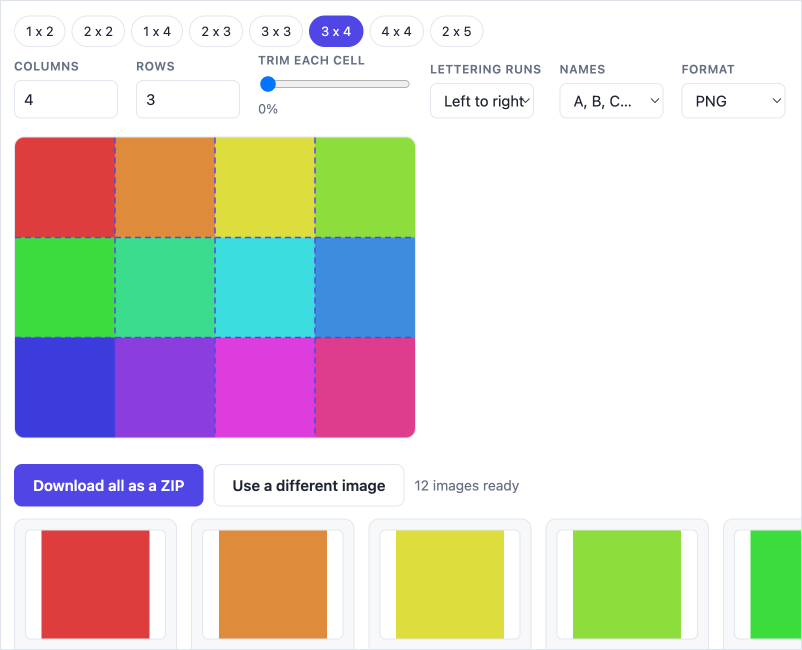
One sheet in, one picture per box out
Picture material for a language lesson almost always arrives as a sheet: four items on a photo card, sixteen pictures on a vocabulary page, a scan of somebody else's worksheet. What a lesson needs is the pictures separately — one to a slide, one to a flashcard, one to a question. Cutting them apart by hand in an image editor is ten minutes nobody has. This does it in a click.
Any grid, not just four across
Set the columns and rows to match the sheet — 2 x 2, 3 x 4, 4 x 4, or anything up to twenty each way. The cut lines are drawn over your image before anything is saved, so you can see whether they land where the boxes are.
Trim the frame off
Sheets carry rules, gutters and staple margins, and a cell cut to the grid brings all of it along. The trim slider pulls every cell's edges inwards by the same amount, so you can take the border off all sixteen boxes at once instead of cropping them one at a time afterwards.
Lettering that runs the right way
On an Arabic photo card the first item is the one on the right. Switch the lettering to right-to-left and the cell in the top right becomes A, not D — so the file names match the order the pupil reads them in, and the answer key still means something.
Everything at once, in one file
A browser refuses a long burst of downloads, so a sixteen-cell sheet saved one file at a time quietly loses most of them. This hands you a single ZIP with every cell inside, named in reading order.
Your image stays on your computer
The cutting happens in the browser. Nothing is uploaded, nothing is stored, and nothing is sent anywhere — which matters when the sheet is a page out of a book, or a photograph with a child in it.
أسئلة شائعة
Do the pictures have to be evenly spaced?
The cells are cut to an even grid, so evenly spaced boxes come out cleanly. If yours are not quite even, pull the trim slider up until each cell holds only the picture — that is usually enough. A sheet with genuinely different-sized boxes is not something this can work out for you.
Which way round is "3 x 4"?
Three across and four down. The preset buttons fill in the columns and rows for you, so you can check the numbers against the picture before you save anything.
Why is one big ZIP better than separate files?
Browsers stop a page after two or three downloads in a row, so saving sixteen cells individually loses most of them without saying so. The ZIP is one download, so nothing goes missing. You can still save any single cell on its own with the button under it.
Is my image uploaded anywhere?
No. The file is read and cut inside your browser and never leaves your device — nothing is uploaded and nothing is stored on our servers. Signing in identifies you to the site; it does not send us your pictures.
Why do I get blank cells from a very large scan?
Phones and tablets cap how big an image the browser will hold — usually around sixteen megapixels — and past that the cut cells come out empty. The tool warns you when your image is over that mark. Shrink the scan and try again.
كل الأدوات، بلا حدّ يومي
افتح مجموعة الأدوات العربية كاملة واستعملها بالقدر الذي تحتاجه. ويمكنك الإلغاء متى شئت.
اطّلع على الخطط